The best AI music generator for a video depends on what the music has to do. If you need a full song with vocals, Suno is the strongest choice. If you need an instrumental bed cut to an exact length, ElevenLabs Music or Adobe Firefly’s Generate Music get you closest, and Firefly can score an uploaded video for free to start. If the video is already on a timeline in ChatCut, you can generate the bed there and fit it to the cut without leaving the editor.
Before you pick on sound quality, check the license. Several popular generators don’t allow commercial use on their free plans, and one well-known option doesn’t let you download anything at all.
ChatCut makes one of the tools on this list. We tested it hands-on with the same 30-second video in three styles, checked every other tool against its official pricing page, terms and help center, and wrote down the limits of each, including ours.
Key Takeaways
- Suno makes complete songs with vocals, but its free plan has no monthly downloads and no commercial rights. Those start with Pro at $10 a month.
- ElevenLabs Music and Adobe Firefly let you set the track length, which matters most when scoring a video. ElevenLabs’ self-serve plans exclude film, TV and radio.
- SOUNDRAW, AIVA and Mubert sell background music with clear license tiers, but read them closely: AIVA keeps the copyright below Pro, and Mubert’s $14 Creator plan is still non-commercial.
- Udio is out for video work right now: downloads are disabled and its terms allow personal, non-commercial use only.
- Whatever you use, save a copy of the license terms on the day you download the track.
Best AI Music Generators at a Glance
| Tool | Best for | Platforms | Free plan, in practice | Paid from | Ease |
|---|---|---|---|---|---|
| Suno | Full songs with vocals | Web, iOS, Android | 50 credits a day; no monthly downloads; no commercial rights | $10/month (Pro) | Easy |
| ElevenLabs Music | Instrumentals at an exact length; API | Web, API | Attribution required; download allowance varies by page | $6/month (Starter) | Easy |
| Adobe Firefly | Scoring an uploaded video | Web | Free daily generations with an Adobe account | Firefly plans; check Adobe | Easy |
| SOUNDRAW | Royalty-free beds you can reshape | Web, API | Generate and preview only; downloads need a plan | $19.99/month (Creator) | Easy |
| Stable Audio | Producers and DAW users | Web, DAW plugin, API, open weights | 50 credits a month | $12/month (Solo) | Medium |
| ChatCut | Scoring a video you’re already editing | Web, macOS, Windows | Starting credits; about 0.2 credits per instrumental | $25/month (100 credits) | Easy |
| AIVA | Orchestral cues, MIDI, owning the copyright | Web, desktop app | 3 downloads a month; non-commercial; credit AIVA | €15/month (Standard) | Medium |
| Mubert | Long background tracks and streams | Web, API | 5 MP3 downloads a month; audible watermark; non-commercial | $39/month for commercial use (Pro) | Easy |
Prices are the vendors’ listed US prices on November 18, 2026 (AIVA lists euros). Several vendors were running Black Friday promotions that day; we list the regular price.
Can You Use AI Music Commercially? License Terms Compared
This is the table to read before you publish. “Commercial use” here means using the track inside your own video, ad or client project, not releasing it as a song on Spotify.
| Tool | Free plan | Paid plan | Who owns it, and the catch | Official source |
|---|---|---|---|---|
| Suno | Personal, non-commercial only | Pro and up, for songs you download through Suno | Suno assigns its rights to paid users; songs you didn’t download can’t be used commercially | Terms |
| ElevenLabs Music | Commercial use with attribution | Commercial use, no attribution | You keep your output; self-serve plans exclude film, TV, radio and studio games | Music Terms |
| Adobe Firefly | Adobe calls it commercially safe | Same | Adobe doesn’t claim ownership; Content Credentials are attached | Generate Music |
| SOUNDRAW | No downloads | All paid plans, including client work, radio and TV | SOUNDRAW keeps the sound-recording rights; no Content ID registration | License |
| Stable Audio | Not confirmed per plan | Yes | Stability’s current terms assign outputs to you | Terms |
| ChatCut | Uses credits | Uses credits | Royalty-free per its feature page; commercial content allowed under the usage policy | AI Music, Usage Policy |
| AIVA | Non-commercial, credit AIVA | Standard: monetize on YouTube, Twitch, TikTok, Instagram; Pro: you own the copyright | AIVA owns the copyright below Pro | EULA |
| Mubert | Non-commercial | Pro or Ultra; Creator is non-commercial | Mubert owns the tracks; no Content ID or streaming release | Pricing, License |
| Udio | Personal only, no downloads | Same | Udio owns the output; no YouTube, TikTok or Spotify | Terms |
Two patterns stand out. Most paid licenses cover music used inside your content, not the track as a standalone release. And several vendors forbid registering their tracks with YouTube Content ID, so you can’t claim the music as your own on the platform.
How We Chose and Tested
We picked tools for one job: putting original, usable music under a video. That narrowed the field to four criteria:
- Fits the video. Can you set the length, get an instrumental, or work from the footage itself?
- Clear commercial terms. Can you download the file and use it in monetized or client work, and what does the license exclude?
- A free way to try it. What the free plan actually lets you hear, download and publish.
- Price for a working creator. The cheapest plan that covers commercial use, not just the cheapest plan.
On November 18, 2026 we ran a hands-on test in our own editor: one 30-second, single-take night scene (a street market, a staircase, a rooftop, then a city skyline), scored three ways. We didn’t generate tracks in the other seven tools. Their facts come from official docs, terms and pricing pages, checked the same day, and we link the source next to each claim. We left out tools whose official pages we couldn’t read or verify.
The 8 Best AI Music Generators for Video
1. Suno: Best for full songs with vocals
Suno turns a prompt or your own lyrics into a complete song with vocals, verses and choruses. Its v6 models, released in September 2026, can also take an image or a video as the starting idea.
Best for: music videos, intros and social clips where the song is the point.
What stands out:
- Up to 8 minutes per generation, with an Instrumental switch when you don’t want vocals.
- Pro adds extend, section replacement, crop and fade, and stem separation, so you can rework the part that doesn’t fit.
- Runs on the web, iOS and Android.
Limits:
- Free accounts get 50 credits a day on the smaller v6-mini model, with no monthly downloads and no commercial rights, per the pricing page.
- Downloads are capped since September 3, 2026: 20 a month on Pro, 60 on Premier. Under the terms, only songs you download through Suno can be used commercially.
- There’s no field for an exact duration, so you’ll still trim to the cut.
Pricing: Free; Pro $10 a month ($8 billed yearly); Premier $30 a month.
Skip it if: you only need a quiet instrumental bed under narration; a background-music tool is cheaper per usable track.
2. ElevenLabs Music: Best for instrumentals cut to an exact length
ElevenLabs Music generates songs or instrumentals from a prompt inside the same platform as ElevenLabs’ voices and sound effects. Music v2.5 launched on September 11, 2026.
Best for: editors who need a 37-second or 2-minute cue, and developers adding music to a product.
What stands out:
- You set the length, from 3 seconds to 5 minutes, and can edit sections or regenerate one part instead of the whole track.
- The license table is unusually specific: commercial use online and offline from the Free plan up, with attribution required only on Free.
- An API is available for automated scoring.
Limits:
- The Music Terms exclude film, TV, radio and studio games on every self-serve plan; those need an enterprise deal.
- Free and Starter can’t distribute tracks to streaming services.
- ElevenLabs’ own pages describe the Free plan’s download allowance differently, so check it in your account before relying on free downloads.
Pricing: Free; Starter $6 a month ($5 billed yearly), which includes music commercial use.
Skip it if: the music is for a TV spot or a film release, unless you’re ready to talk to sales.
3. Adobe Firefly Generate Music: Best for scoring an uploaded video, free to start
Generate Music is Adobe Firefly’s instrumental music generator. It launched in public beta as Generate Soundtrack at Adobe MAX 2025 and became generally available in August 2026.
Best for: creators who want to drop in a finished video and get a matching instrumental.
What stands out:
- Upload a video to score it, or prompt from text, and set energy, tempo and a duration from five seconds to five minutes.
- Adobe says the music is commercially safe for anything “from personal social content to national advertising campaigns” and that it doesn’t claim ownership of what you generate.
- Export a WAV, or the track combined with your video.
Limits:
- Instrumental only; Adobe says it isn’t for vocals or songwriting.
- The free tier is a daily allowance with an Adobe account; Adobe doesn’t publish a fixed number of free tracks on the feature page.
- Firefly is a generation studio, so detailed mixing under dialogue still happens in your editor.
Pricing: Free daily generations with an Adobe account; higher volume needs a paid Firefly plan. See Adobe’s Firefly plans for current prices in your region.
Skip it if: you need lyrics or a vocal hook.
4. SOUNDRAW: Best for background beds you can reshape
SOUNDRAW builds royalty-free tracks from a genre, mood and length, trained on music made by its in-house team. You then reshape the result: change the energy of each section, mute instruments, add fades.
Best for: YouTubers and social teams who publish every week and want predictable, license-clear beds.
What stands out:
- The license covers YouTube, product videos, live streams, client work, radio and TV on all paid plans, with no credit required.
- Creator includes unlimited downloads, and tracks downloaded while you’re subscribed stay licensed after you cancel, per its FAQ.
- Set the length up to 5 minutes and adjust each block’s intensity to follow your edit.
Limits:
- You can generate and preview for free, but downloading and using tracks needs a subscription.
- SOUNDRAW keeps the sound-recording rights, and tracks can’t be registered with Content ID.
- WAV files and stems come only with the higher Artist plans; Creator is MP3.
Pricing: Creator $19.99 a month, or $16.99 a month on a 12-month plan.
Skip it if: you want to release the track as a song; the Creator plan doesn’t allow distribution to streaming services.
5. Stable Audio: Best for producers and DAW workflows
Stable Audio is Stability AI’s music and sound generator. Stable Audio 3.0, announced in May 2026, is trained on licensed data and comes in sizes from an on-device model to a large hosted one.
Best for: musicians and audio editors who want to generate inside their DAW or run a model themselves.
What stands out:
- Length is set to the second, up to about six minutes, which helps when a cue has to hit a cut.
- Every plan includes the web app and a DAW plugin. An August 2026 update added audio-to-audio, multi-track editing and extension.
- Stability’s terms assign outputs to you, and the open-weight models allow commercial use under its Community License (organizations with more than $1M in revenue need an Enterprise license).
Limits:
- The free plan is 50 credits a month, which goes quickly.
- We couldn’t confirm the per-plan license wording on the pricing page, so check it before publishing free-plan output.
- Stable Audio 3.0 doesn’t generate vocals or lyrics, and it’s built for people comfortable shaping audio rather than one-click beds.
Pricing: Free; Solo $12 a month for 660 credits.
Skip it if: you want the simplest path from prompt to finished bed.
6. ChatCut: Best for scoring a video you’re already editing
ChatCut is an AI video editor, not a dedicated music app. You ask for music in plain language, the track lands in your project, and you trim, fade and mix it on the same multi-track timeline as your footage. The docs cover what to put in a music prompt.
Best for: a video that’s already cut and needs an instrumental bed fitted to its length.
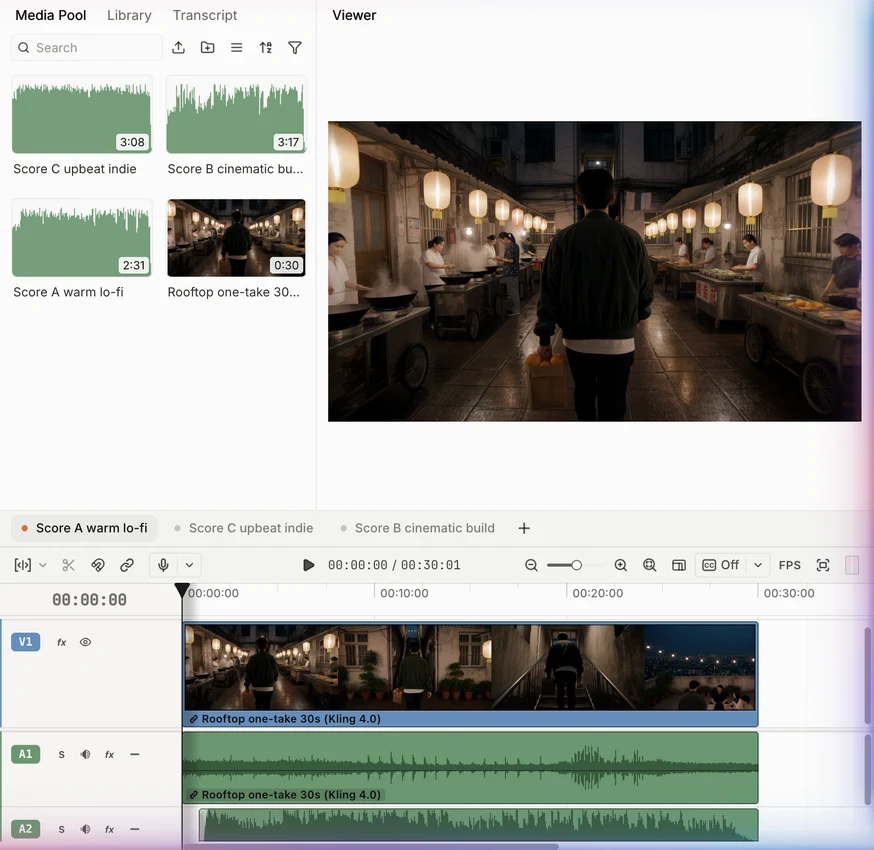
What we tested: we gave a 30-second single-take scene three instrumental briefs: warm lo-fi, a cinematic build, and upbeat indie. All three tracks came back in under three minutes, at 0.22 credits each (0.66 credits in total, about 17 cents at the $0.25 credit face value). Each track ran 2:31 to 3:17, so instead of fading out a random 30 seconds, we built each cue from the end of its track so the composed ending falls on the skyline shot. We then moved each track’s start point once, three adjustments in all, and kept the original street sound at −10 dB underneath.
What stands out:
- Generation, trimming, fades and the mix with dialogue happen in one project, so a new version of the cut doesn’t mean a new export and import.
- An instrumental uses about 0.2 credits, per the credits policy.
- Its feature page describes generated tracks as royalty-free for YouTube, TikTok, ads and client work.
Limits:
- You can’t request a length. Our tracks came back five to six times longer than the video, so plan to trim, back-time or loop on the timeline.
- Each request creates a new track; it doesn’t remix or extend an existing recording, and exact beat alignment isn’t guaranteed.
- AI requests use credits, and it needs an internet connection, including the Desktop app. There’s no Linux version.
Pricing: Free plan with a starting credit allowance; paid plans from $25 a month for 100 credits.
Skip it if: you want a standalone song to release, or stems to rework in a DAW.
Try a version of our test prompt on your own video:
7. AIVA: Best for orchestral cues, MIDI and owning the copyright
AIVA is a composition assistant that generates in more than 250 styles and lets you edit the result, guide it with an audio or MIDI “influence,” and export MIDI.
Best for: film, game and trailer work where you want a score-like cue, or want to finish the piece in a DAW.
What stands out:
- MIDI export turns a generation into notes you can rearrange and re-orchestrate.
- On Pro, the EULA assigns the composition’s copyright to you, which few generators offer.
- Web app plus desktop apps for macOS, Windows and Linux.
Limits:
- Free is non-commercial and requires credit to AIVA, with 3 downloads a month.
- Standard lets you monetize only on YouTube, Twitch, TikTok and Instagram, and AIVA keeps the copyright.
- Tracks top out at 3 to 5.5 minutes depending on the plan, and there are no vocals.
Pricing: Free; Standard €15 a month (€11 billed yearly); Pro €49 a month (€33 billed yearly).
Skip it if: you need an ad or client deliverable on a budget; Standard’s license won’t cover it.
8. Mubert: Best for long background tracks and streams
Mubert Render generates instrumental tracks from a prompt, mood or genre, and can make them very long, which suits streams, podcasts and ambient loops.
Best for: streamers and podcasters who need long, unobtrusive background music.
What stands out:
- Generated tracks can run up to 25 minutes on Pro and 60 on Ultra.
- Paid plans can change a track’s duration, BPM, key and sections in the Track Editor.
- For short-form clips, Mubert’s separate Fuse tool scores an uploaded clip to its length and mood.
Limits:
- The free plan is non-commercial, adds an audible watermark and requires attribution.
- The $14 Creator plan is also non-commercial; commercial use starts at Pro, and client or agency work needs Ultra, per the pricing FAQ.
- Mubert owns the tracks. You can’t register them with Content ID, and you can’t use them in new projects after you cancel.
Pricing: Free; Creator $14 a month (non-commercial); Pro $39 a month; Ultra $89 a month.
Skip it if: you need a commercial license for under $20 a month.
Also Considered
- Udio made headlines for song quality, but after its Universal Music partnership it disabled downloads, and its current terms allow personal, non-commercial use and forbid posting output to YouTube, TikTok or Spotify. Not usable for video delivery today.
- Beatoven.ai can take a video as input and generates royalty-free background music. Its FAQ grants a perpetual, non-exclusive license while Beatoven remains the owner, and it doesn’t allow streaming distribution. Two of its official pages listed different prices when we checked, so confirm in the app.
- Loudly includes a commercial license with every paid plan and can allow-list your YouTube channel, but its license forbids Content ID claims. We couldn’t read its prices from the pricing page.
How to Choose an AI Music Generator for Your Video
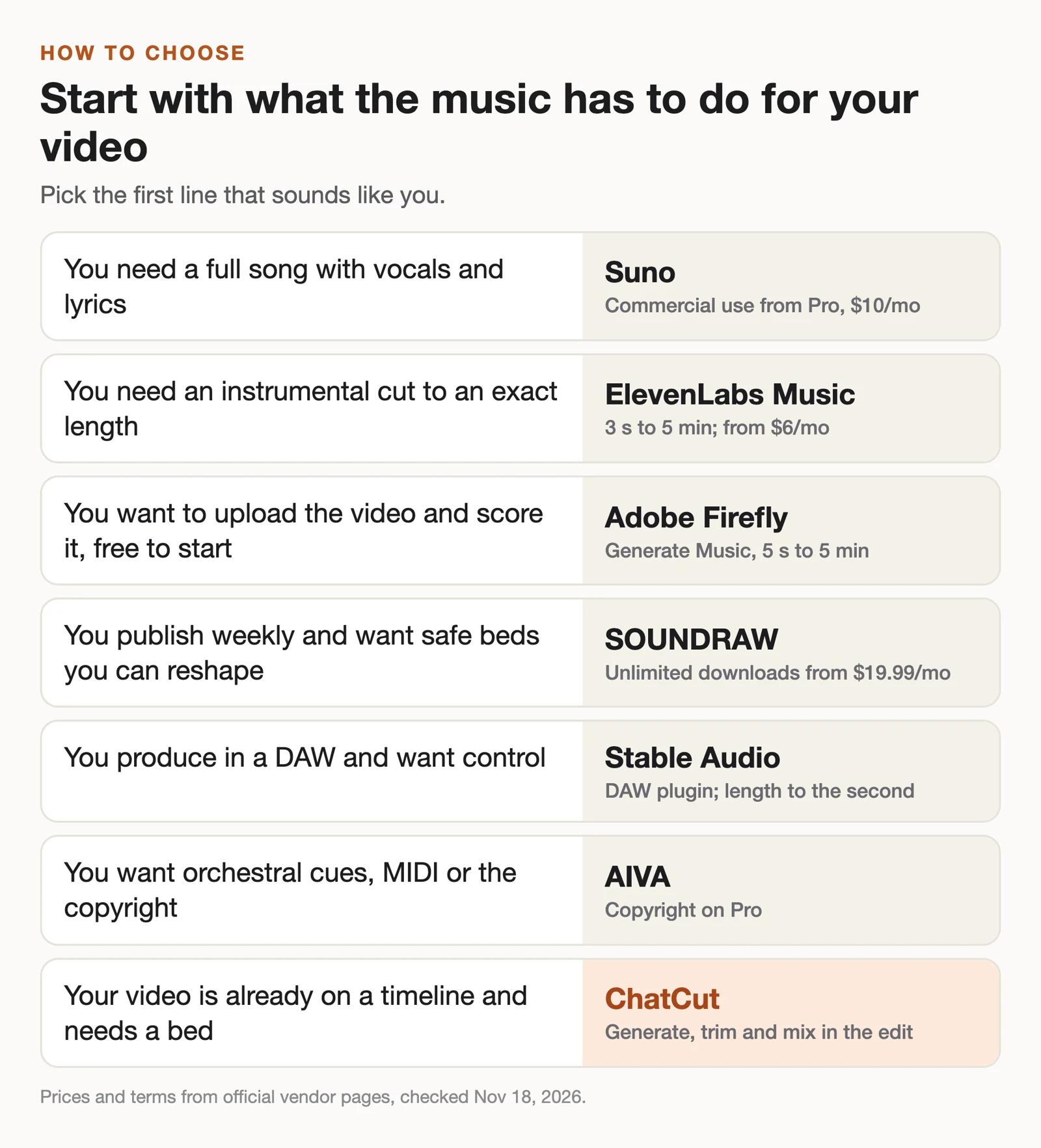
- If you need lyrics and a singer, pick Suno on a paid plan.
- If you need an instrumental at an exact length, pick ElevenLabs Music, or Adobe Firefly if you’d rather upload the video.
- If you publish every week and want beds with a broad license, pick SOUNDRAW.
- If you work in a DAW, pick Stable Audio; for MIDI and copyright, AIVA Pro.
- If you need hours of background for streams, pick Mubert Pro.
- If your video is already on a timeline in ChatCut, generate the bed there and fit it to the cut.
For a step-by-step guide to the editing side, see how to add music to a video, or open the add music to video app.
How to Fit an AI Track to Your Video
Most generators hand you a track that’s longer or shorter than your cut. Four habits from our test make it sound intentional:
- Back-time the ending. Line up the track’s natural ending with your last shot, then fade in the start. An ending the model composed sounds better than a fade in the middle of a phrase. Watch for a second of silence at the end of the file.
- Keep the location sound. We kept the clip’s own ambient sound at −10 dB under the music instead of muting it, so the scene still sounds like a place.
- Duck under speech. If someone talks, lower the music under the dialogue rather than across the whole video.
- Save the license. Screenshot or save the terms and your plan on the day you download, since several vendors changed their terms in 2026.
For music videos built around a song, see our music video use case.