
The best Claude Code plugins for creators are the ones that match the job you do every week. For visuals, start with Canva (or Figma for UI work); for writing, Notion; for research, Firecrawl. For editing your own footage, ChatCut lets Claude cut, caption and reframe video on a real timeline you can open afterwards.
This guide covers 12 plugins across design, writing, research, video, audio, publishing and automation: what each one does in Claude Code, the exact install command, what the service behind it costs, and where it stops. ChatCut makes one of the plugins on this list. It’s the only one we tested hands-on; the other 11 are described from their official docs and pricing pages, and every entry, including ours, lists its limits.
Key takeaways
- Install from Anthropic’s official marketplace when you can:
/plugin install <name>@claude-plugins-official. Anthropic doesn’t review third-party marketplaces. - A Claude Code plugin runs inside Claude Code on your computer. A claude.ai connector runs in Claude’s web, desktop and mobile chat. Some services offer both; some only one.
- Most plugins are free to install, but the service behind them has its own plan: Figma’s MCP server allows 6 tool calls a month on Starter, and each Zapier tool call uses 2 tasks.
- Start with one or two. An enabled plugin is part of every session, not only the ones where you use it.
Claude Code plugins at a glance
| Plugin | Best for | Works through | Free tier | Paid from | Setup |
|---|---|---|---|---|---|
| Canva | Social graphics, resizes, brand checks | Canva account (hosted MCP) | Free Canva accounts supported; bulk-create needs Enterprise | Priced by region | One command, Canva sign-in |
| ChatCut | Editing your own video | Desktop app on macOS or Windows | Editing, captions and local exports; 60 min of cloud exports | $25/month (100 credits) | One message; Claude installs it |
| Notion | Drafts, notes, content calendars | Notion workspace (hosted MCP) | Free plan; 5 MB uploads | Plus $10/member/month | One command, OAuth |
| Figma | Design files and UI | Figma (remote MCP) | 6 tool calls/month on Starter | Dev seat $12/month | One command, sign-in |
| Firecrawl | Web research, scraping | Firecrawl (hosted MCP) | 1,000 credits/month | $19/month ($16 billed yearly) | One command, /mcp sign-in |
| Exa | Search and deep research | Exa (hosted MCP) | $10 of credits/month | Usage-based | One command |
| HyperFrames | Motion graphics from code | Local renderer, Node.js 22+ | Free, open source | Free | One command |
| Save to Spotify | Audio episodes from text | Spotify account plus a voice engine | Free; local voice included | Free | Plugin plus CLI, Spotify login |
| Postiz | Scheduling posts | Postiz account plus CLI | 7-day trial | $29/month (5 channels) | Plugin, npm CLI, login |
| Zapier | 9,000+ other apps | Zapier MCP | 100 tasks/month (2 per tool call) | $19.99/month | One command, guided setup |
| Playwright | Browser tasks, page checks | Local browser, Node.js 18+ | Free, open source | Free | One command |
| Frontend Design | Landing pages, portfolio sites | Nothing external | Free | Free | One command |
Prices are each vendor’s listed prices on November 18, 2026. Most Claude Code surfaces need a Claude subscription or an Anthropic Console account, and the desktop app’s Code tab needs a paid plan (Claude Code overview).
Claude Code plugins vs. Claude connectors
“Claude plugins” and “Claude connectors” get used interchangeably, but they install in different places and run in different places.
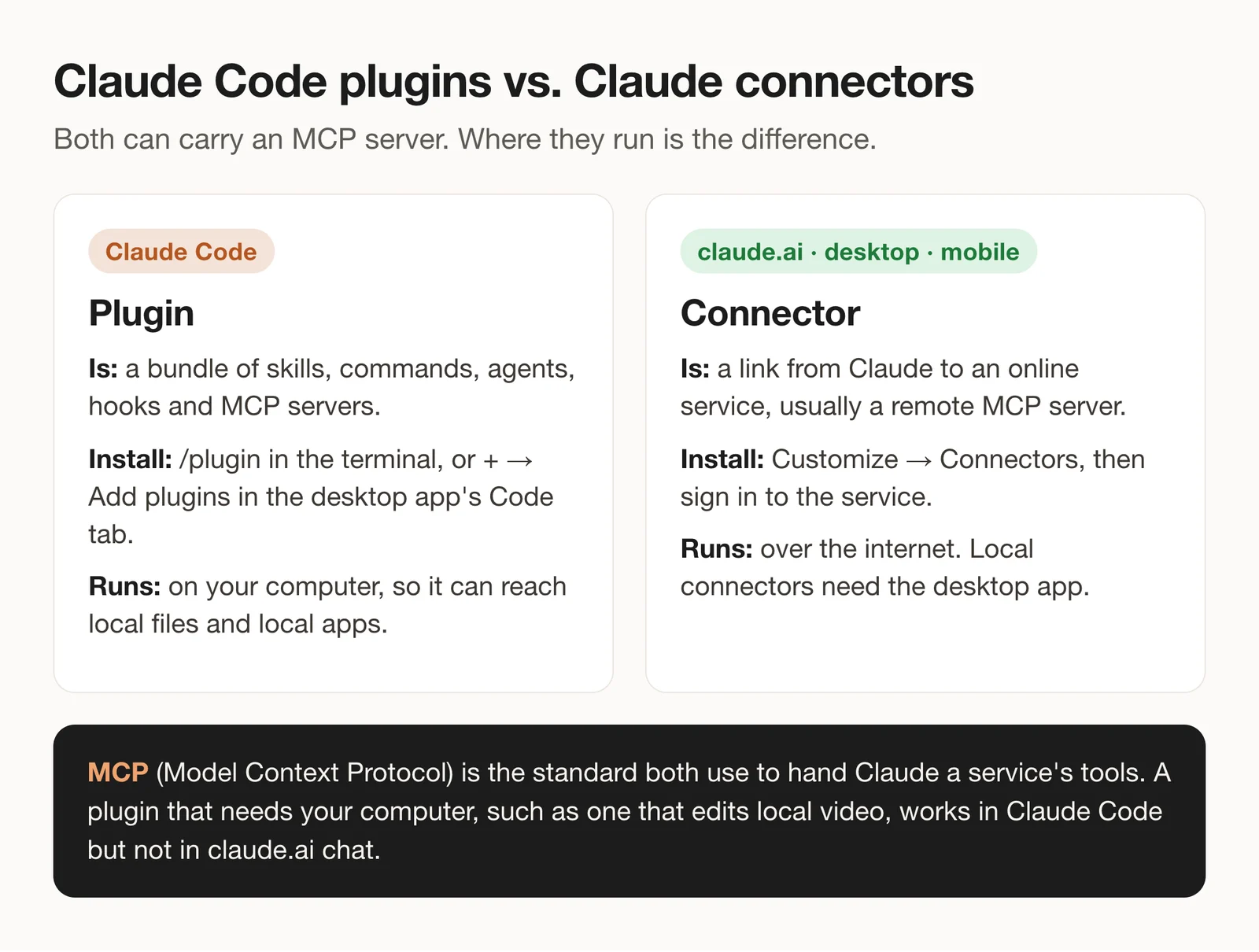
A Claude Code plugin is, in Anthropic’s words, “a directory of skills, agents, hooks, MCP servers, or other components that Claude Code installs and loads as one unit” (plugin docs). It runs in the terminal, the desktop app’s Code tab or the VS Code extension, so it can work with files and apps on your computer.
A connector links Claude to an outside service such as your calendar or design library. You add it from Customize > Connectors in claude.ai or the desktop app, and it works in web, desktop and mobile chat (connectors guide). Custom connectors added by URL work on every plan, including Free, which is limited to one (Anthropic help center).
claude.ai now has plugins too, under Customize > Plugins, and they sync to Claude Code. The catch is local tools: a plugin connector marked Runs in each session runs on your computer, so it works in Claude Code and local Cowork sessions, not in chat (plugins on claude.ai). That’s why a plugin that edits video files on your disk belongs in Claude Code.
How to install a Claude Code plugin
Anthropic’s official marketplace, claude-plugins-official, is added automatically the first time you start an interactive terminal session (Anthropic’s marketplaces).
- Terminal: run
/pluginto browse the Discover tab, or/plugin install canva@claude-plugins-officialto open one plugin’s details. Pick a scope: just you, everyone on this repository, or you in this repository only. - Desktop app: in a local session on the Code tab, click + next to the prompt box, then Add plugins.
- Shell or setup script:
claude plugin install <name>@claude-plugins-official. It loads the next time you start Claude Code.
For a plugin that lives in its author’s own marketplace, add that marketplace first with /plugin marketplace add <owner>/<repo> (install guide). You can also browse everything on the web at Claude Marketplace.
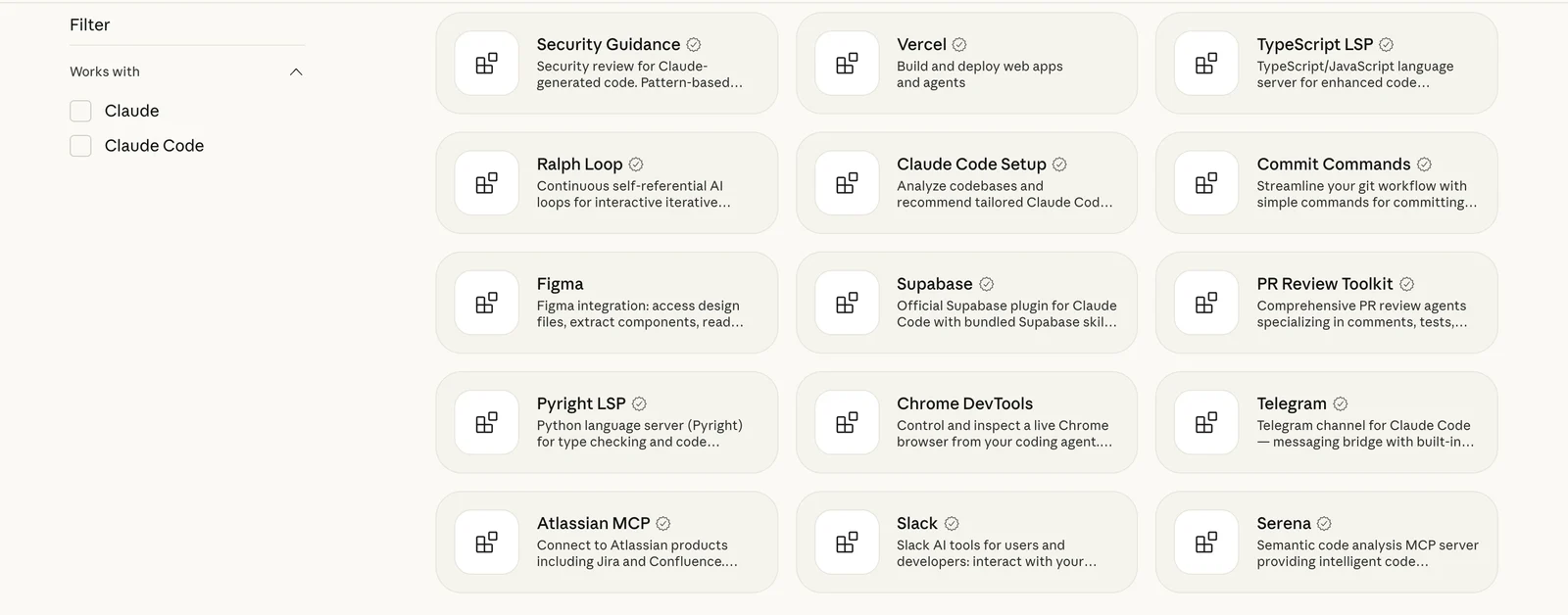
Read the details pane before you confirm. Anthropic’s own warning: “A Claude Code plugin you install can execute arbitrary code on your machine with your user privileges” (plugin security).
How we chose and tested
- Maintained by the vendor or a trusted team, preferably listed in Anthropic’s official marketplace, and updated on GitHub within the last month (checked November 18, 2026).
- Useful for a creator’s week: visuals, writing, research, video, audio, publishing or automation. We left out plugins built mainly for software teams.
- Works in Claude Code today, with a documented install path.
- Honest cost: what the plugin needs (an account, a CLI, an API key) and what the service behind it charges.
We ran one hands-on test, on the plugin we make: Claude, working in Claude Code, cut a podcast clip into a vertical short. The other 11 entries are based on official docs, repositories and pricing pages, checked on November 18, 2026. We didn’t install them for this guide, so we don’t rank output quality.
The 12 best Claude Code plugins for creators
1. Canva: Best for social graphics and quick visual edits
Canva’s official plugin connects Claude to the Canva MCP server and adds six skills: resize a design for social platforms, bulk-create from a spreadsheet, apply reviewer comments, edit a design, give design feedback and check a design against your brand kit.
Best for: creators who already keep thumbnails, carousels and decks in Canva.
What stands out:
- Edits are approval-gated: Claude batches changes and commits only after you approve them (canva-skills).
- One request can produce Facebook, Instagram and LinkedIn sizes, each with a Canva edit link.
Limits:
- Bulk-create uses brand-template autofill, which needs Canva Enterprise.
- It flags edits the Canva API can’t perform rather than doing them, so some fixes stay manual.
Pricing: Canva says its AI connector works with free accounts (Canva help); Pro and Business are priced by region on Canva’s pricing page.
Install: claude plugin install canva@claude-plugins-official
Skip it if: your visuals live in Figma or Adobe apps.
2. ChatCut: Best for editing video from Claude Code
ChatCut is an AI video editor. With its plugin, Claude imports your footage, cuts it from the transcript, adds captions, reframes and exports, and every change lands on a real multi-track timeline you can open and adjust by hand.
Best for: turning talking-head recordings, podcasts and tutorials into finished clips without leaving Claude Code.
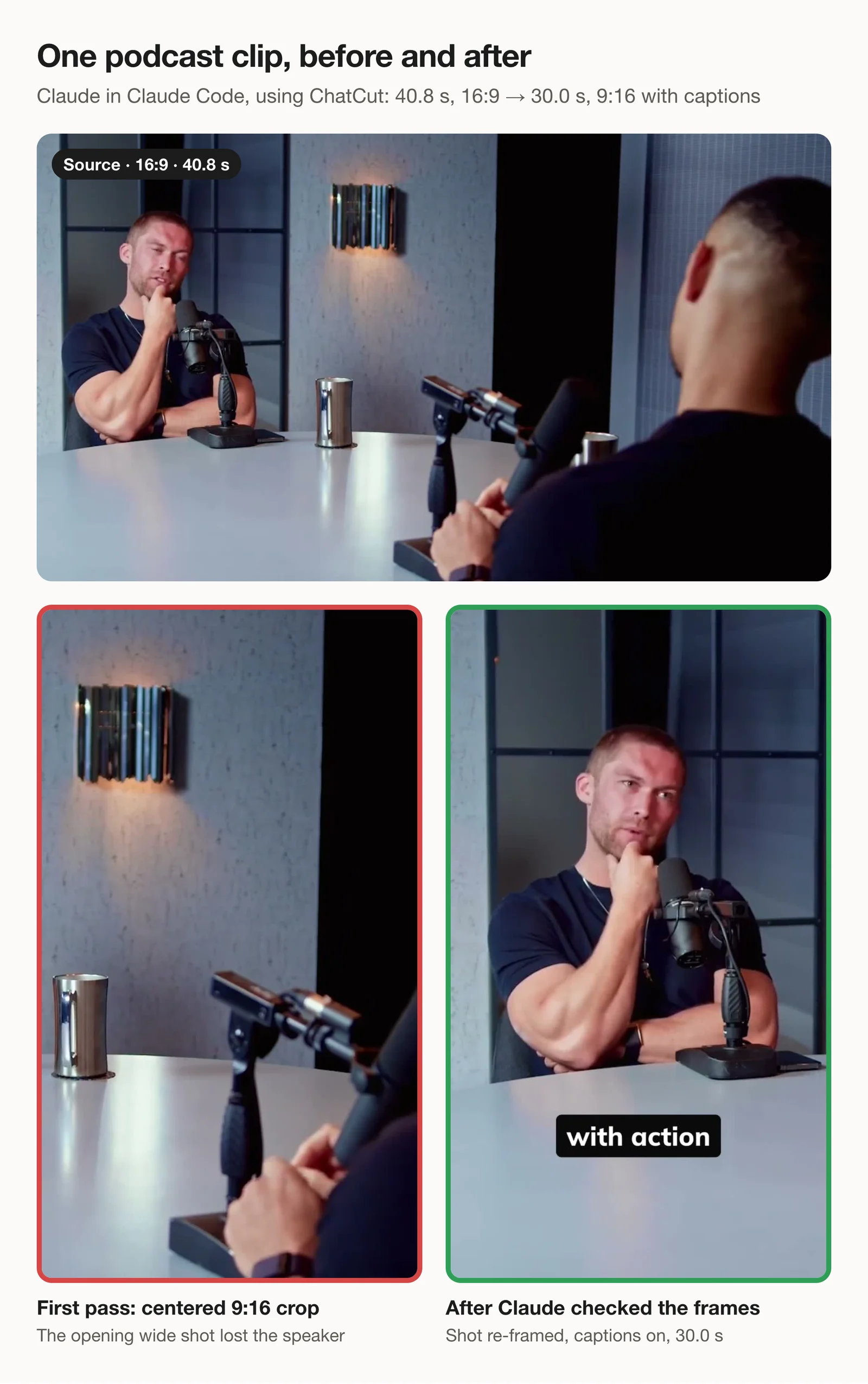
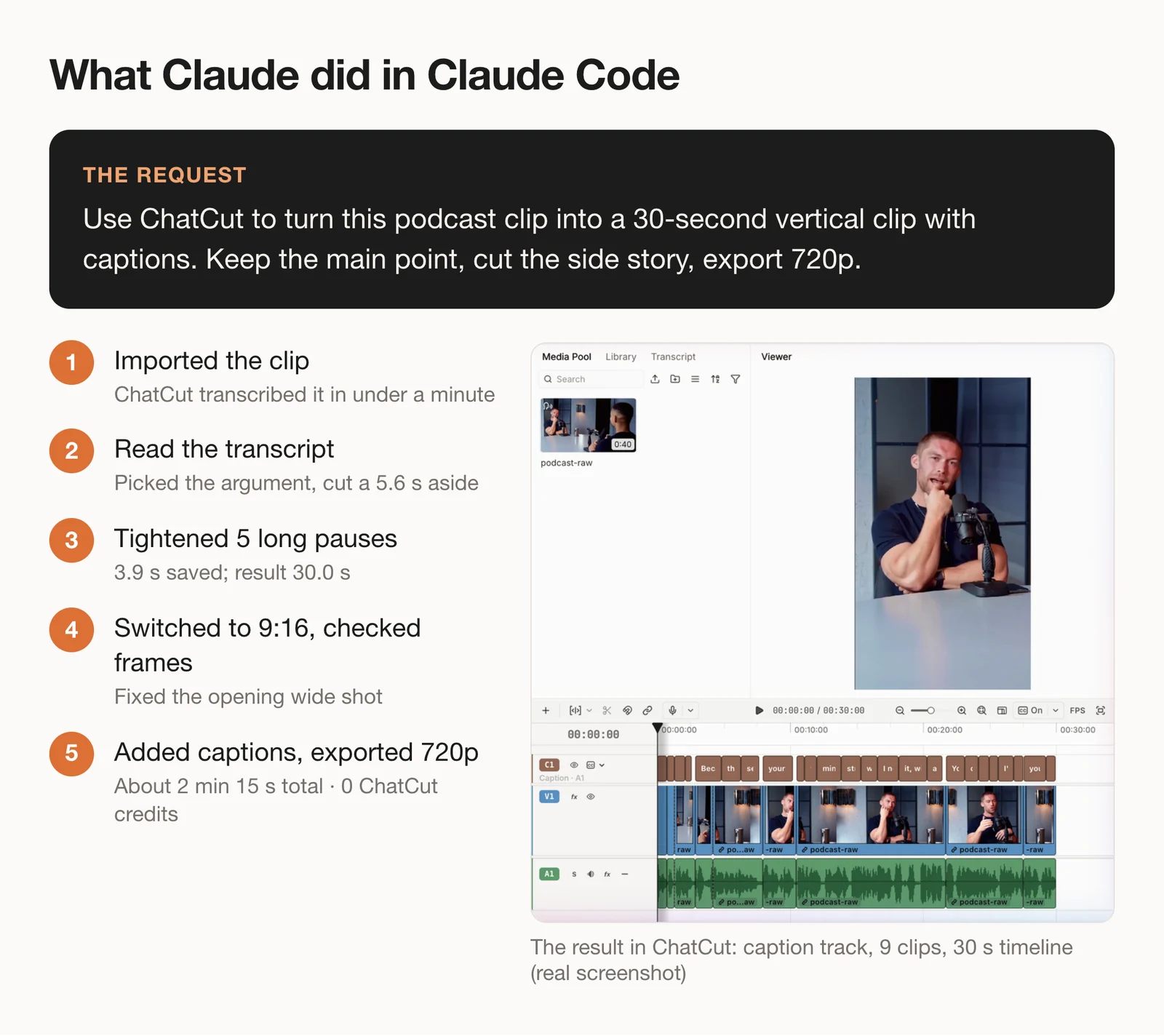
This test was run by Claude in Claude Code through the ChatCut plugin. The request: turn a 40.8-second podcast clip into a 30-second vertical clip with captions, keep the main point, cut the side story, export at 720p. Claude cut a 5.6-second aside from the transcript, tightened five long pauses, switched the canvas to 9:16 and added captions. Then it checked frames and found that the centered crop lost the speaker in the opening wide shot, so it split that shot and re-framed it. The 720p export finished about 2 minutes 15 seconds after the first step, with no edits by hand, and used 0 ChatCut credits.
Try the same request on your own recording:
What stands out:
- The result is an editable project, not just a rendered file: open it, move a cut, restyle the captions.
- Claude’s reasoning runs on your Claude plan. Editing, transcription, captions and exports don’t use credits; credits pay only for generation such as AI video, voiceover or music (product facts).
Limits:
- It runs in Claude Code on macOS 13+ or Windows 10+ (x64). There’s no Linux app, and it can’t be installed in claude.ai or Claude’s mobile app.
- It needs an internet connection, even with the desktop app.
- In our test, switching to 9:16 started from a centered crop. On multi-camera footage, ask Claude to check every shot, as it did here.
Pricing: free plan with the editor, transcription, captions and up to 60 minutes of cloud exports (local exports don’t count); paid plans from $25 a month for 100 credits. AI video and image generation need a paid plan.
Install: start a new Claude Code conversation and send the message below. Claude runs the official installer, then you sign in and start a new conversation so the tools load. The Agent Plugin guide and the Claude Code page cover the details.


-
 Codex
-
 Claude Code
-
 Antigravity
-
 Hermes Agent
- + any MCP client
Skip it if: you edit on a phone, work on Linux, or want color grading and finishing tools.
3. Notion: Best for drafts, notes and content calendars
Notion’s official plugin bundles the Notion MCP server, 12 skills from the Notion Cookbook and slash commands such as /Notion:search, /Notion:create-page and /Notion:create-task.
Best for: writers and creators whose ideas, scripts and publishing calendar already live in Notion.
What stands out:
- Skills cover real workflows, including “Plan marketing campaigns”, “Research documentation” and “Knowledge capture” (plugin repo).
- It signs in to Notion with OAuth.
Limits:
- The Free plan caps uploads at 5 MB per file, and shared workspaces hit a block limit.
- The README asks you to restart Claude Code after installing so the MCP server starts.
Pricing: Free; Plus is $10 per member a month.
Install: claude plugin install notion@claude-plugins-official
Skip it if: your drafts live in Google Docs or Obsidian.
4. Figma: Best for design files and UI work
Figma’s plugin connects Claude Code to its remote MCP server at https://mcp.figma.com/mcp. Claude can read a selected frame as structured code, pull your variables and styles, and, in beta, write native content to the canvas (Figma MCP guide).
Best for: designers and creators who build sites, templates or UI kits in Figma.
What stands out:
get_design_contexthands Claude a React and Tailwind representation of your selection.- Writing to the canvas is free during the beta, and write tools are exempt from rate limits.
Limits:
- On the Starter plan, or with a View or Collab seat, you get up to 6 tool calls a month.
- Placeholder images from
generate_imageuse Figma AI credits.
Pricing: Professional from $12 a month for a Dev seat, $16 for a Full seat.
Install: claude plugin install figma@claude-plugins-official
Skip it if: you design in Canva and never touch Figma files.
5. Firecrawl: Best for web research and scraping
Firecrawl’s plugin connects to its hosted MCP server and ships 19 skills, including deep research, SEO audits, brand assets, news coverage, and video and podcast transcripts. Commands include /firecrawl:search, /firecrawl:scrape and /firecrawl:agent for a cited multi-source investigation (plugin repo).
Best for: researching a script or article from many sources, with citations.
What stands out:
- The free tier refreshes every month: 1,000 credits, no credit card.
- One credit scrapes one basic page, so light research rarely runs out.
Limits:
- Structured formats (JSON, questions, highlights) add 4 credits per page.
- Version 2 moved crawl, map and other CLI skills into a separate install.
Pricing: Hobby is $19 a month, or $16 billed yearly, for 5,000 credits.
Install: claude plugin install firecrawl@claude-plugins-official, then connect your account with /mcp.
Skip it if: you already use Exa or another search plugin.
6. Exa: Best for search-heavy research
Exa is a search engine built for AI agents. Its plugin connects to https://mcp.exa.ai/mcp for web search, content extraction, and people, company and paper searches (Exa MCP).
Best for: finding sources fast: competitors, experts, studies, recent coverage.
What stands out:
- Free credit every month: $10 plus a $10 onboarding bonus, with no payment method (Exa pricing).
- Research skills come bundled, not just a raw search tool.
Limits:
- Past the free credit, every search is billed by usage.
- The Exa Agent tool needs OAuth or an API key.
Pricing: usage-based after the monthly free credit.
Install: claude plugin install exa@claude-plugins-official
Skip it if: you mostly need full pages scraped rather than searches.
7. HyperFrames: Best for motion graphics built from code
HyperFrames from HeyGen is an open-source framework that turns HTML, CSS, media and animations into deterministic MP4s. Its plugin teaches Claude the whole loop: plan, write the composition, add captions or voiceover, preview and render.
Best for: title cards, explainers, product intros and data animations you want to version like code.
What stands out:
- Free and Apache-2.0 licensed, with more than 85,000 GitHub stars, last updated November 17 (repo).
- The free Studio app runs on macOS, Windows and Linux.
Limits:
- Rendering needs Node.js 22 or newer on your machine.
- It builds new videos from HTML compositions; editing existing footage isn’t its focus.
Pricing: free. An optional Studio Pro plan adds HeyGen’s video, image, voice and music models.
Install: claude plugin install hyperframes@claude-plugins-official
Skip it if: you’d rather not review code to change an animation.
8. Save to Spotify: Best for turning writing into audio
Spotify’s Save to Spotify lets Claude script, narrate and save an audio episode to your Spotify account: a daily briefing, a deep dive on an article, a meeting recap.
Best for: newsletter writers and researchers who want to listen to their own material.
What stands out:
- The default voice engine, Kokoro, runs locally for free with no API key (about 340 MB).
- Episodes can include a timeline and cover image.
Limits:
- It saves audio but doesn’t generate speech itself; better voices need your own OpenAI or ElevenLabs key.
- It installs a separate command-line tool and needs a Spotify login.
Pricing: free and open source; third-party voices bill separately.
Install: claude plugin install save-to-spotify@claude-plugins-official
Skip it if: you don’t listen on Spotify.
9. Postiz: Best for scheduling social posts
Postiz schedules posts across 28+ platforms, including X, LinkedIn, Reddit, YouTube, TikTok and Instagram. Its Claude Code plugin is a skill that drives the Postiz CLI, which also handles media uploads and analytics (postiz-agent).
Best for: creators who repurpose one piece into posts for several channels.
What stands out:
- One request can schedule a multi-platform post with platform-specific settings.
- Every plan includes the MCP server, CLI and API.
Limits:
- You install the CLI with npm and log in before Claude can post.
- Some platforms, such as TikTok, don’t return a post ID right away, so analytics need an extra step.
Pricing: from $29 a month for 5 channels, after a 7-day free trial.
Install: claude plugin install postiz@claude-plugins-official
Skip it if: you post to one platform and its own scheduler is enough.
10. Zapier: Best for connecting everything else
Zapier’s plugin connects Claude to Zapier MCP: 9,000+ apps and 40,000+ actions, from Gmail and Google Sheets to HubSpot and Slack. Say “onboard zapier” and it walks you through setup (plugin).
Best for: the long tail of tools that don’t have their own plugin.
What stands out:
- A guided demo runs one real action before you configure anything.
- Failed tool calls don’t use tasks.
Limits:
- Each successful tool call uses 2 tasks, so the free plan’s 100 tasks cover about 50 calls a month (Zapier MCP usage).
- Actions run with the permissions of the accounts you connect.
Pricing: free plan with 100 tasks a month; Professional from $19.99 a month.
Install: claude plugin install zapier@claude-plugins-official
Skip it if: the apps you use already have dedicated plugins.
11. Playwright: Best for browser tasks and page checks
Microsoft’s Playwright MCP lets Claude drive a real browser: open pages, click, fill forms and take screenshots.
Best for: checking how a published page looks, capturing screenshots for a post, or repeating a web task.
What stands out:
- Free and open source, running on your computer.
- It reads pages through the accessibility tree, so it doesn’t need a vision model.
Limits:
- It needs Node.js 18 or newer.
- Microsoft notes that its CLI with skills is more token-efficient than the MCP server for coding agents.
Pricing: free.
Install: claude plugin install playwright@claude-plugins-official
Skip it if: you only need page text; a scraper is lighter.
12. Frontend Design: Best for building your own landing page
Frontend Design is Anthropic’s own plugin. It’s a skill that steers Claude toward distinctive, production-grade interfaces instead of generic-looking AI layouts.
Best for: a portfolio, link-in-bio page or launch page you’ll host yourself.
What stands out:
- No account or external service; it’s instructions for Claude.
- Maintained in Anthropic’s official marketplace.
Limits:
- It writes code. You still need somewhere to host the page.
- It’s a design skill, not a design tool: there’s no canvas to drag things around.
Pricing: free; it runs on your Claude plan.
Install: claude plugin install frontend-design@claude-plugins-official
Skip it if: you want a site builder with templates and hosting included.
Also considered
- Adobe for creativity has creative skills for batch photo edits, social variations and quick video cuts, but Adobe’s repository says its server returns a 403 to the Claude Code CLI and works from the Claude desktop app or Cowork.
- Context7 pulls up-to-date library docs into Claude Code. Great for code, less useful for creative work.
- GitHub is the official GitHub MCP server. Worth adding if you publish a site or open-source project.
- Slack searches messages and threads; helpful for team context, not for making content.
- Miro reads and draws on boards, but its plugin repository hadn’t been updated in two months when we checked.
How to choose
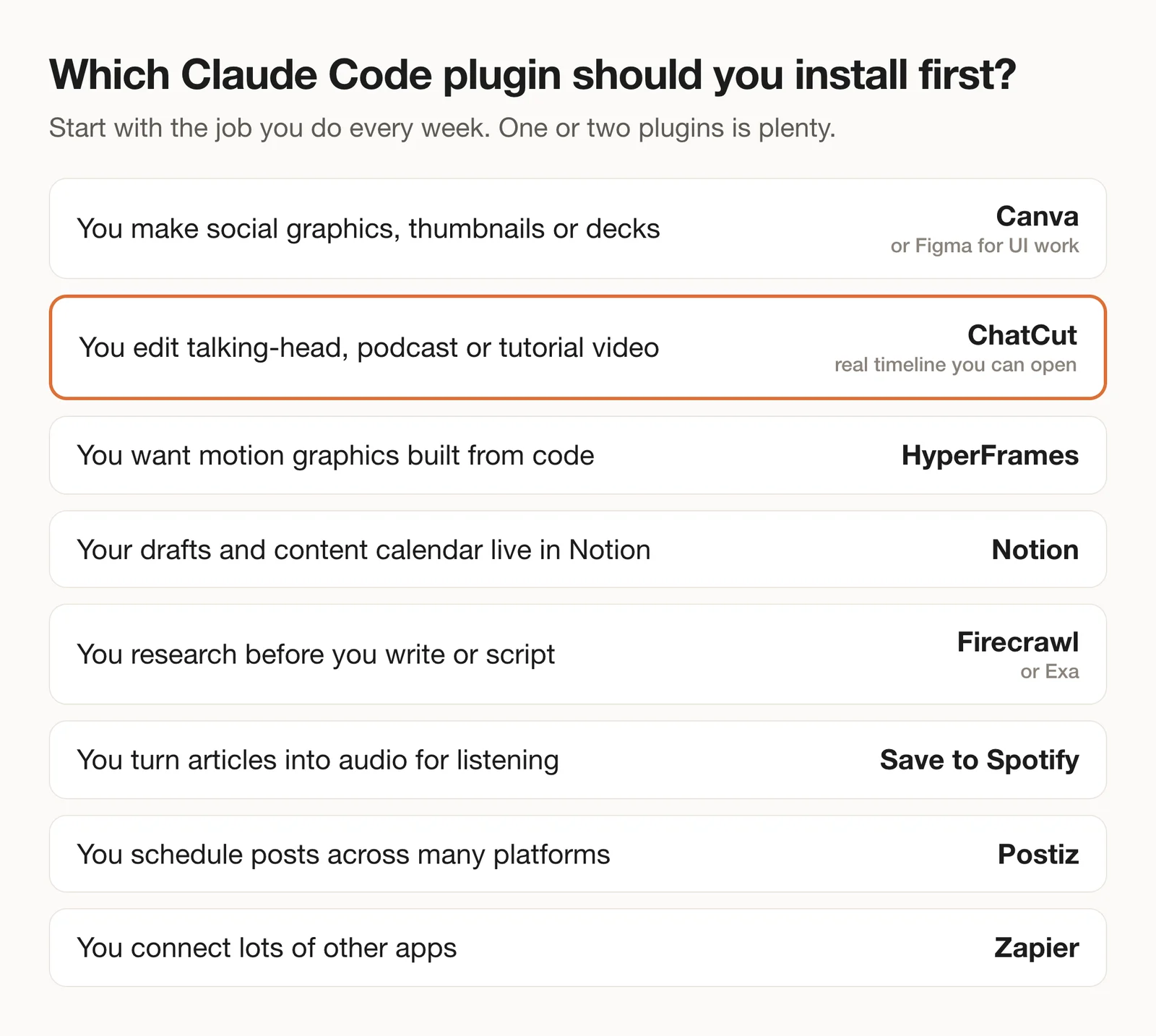
- If you make thumbnails, carousels and decks, pick Canva; if you work in design files, Figma.
- If you edit talking-head, podcast or tutorial video, pick ChatCut.
- If you want animated titles or explainers you can version like code, pick HyperFrames.
- If you research before you write, pick Firecrawl for pages or Exa for search.
- If your drafts and calendar live in Notion, pick Notion; to post them everywhere, add Postiz.
- If the tool you need isn’t on this list, try Zapier before building anything.
For the video side in more depth, see Claude Code video editing: 15 skills and tools compared, our step-by-step guide to editing video with Claude, and the video editing MCP servers that work with other agents. Wondering whether Claude can edit video at all? Here’s the short answer.